Roll call in a few taps
Open today’s session, mark Present, Absent or Late with one gesture, then submit the roll call. Designed mobile-first, from the instructor’s phone, with no notebook or loose sheet.

Nezam’s attendance tracking software lets the instructor take roll for a session in a few taps — Present, Absent or Late, with reason and behaviour — then submit the roll call.
Why it’s better
Four concrete benefits for the instructor, management and families.
Open today’s session, mark Present, Absent or Late with one gesture, then submit the roll call. Designed mobile-first, from the instructor’s phone, with no notebook or loose sheet.
From the very first minute of absence or lateness, the legal guardian receives a push notification on the parent app. No one has to be chased to report an absence.
Every absence or lateness carries its reason. Each learner can receive positive or negative behaviour for the session — tracking that flows back to families, not just a column of ticks.
As long as the roll call isn’t submitted, the dashboard flags it. No more forgotten session: management sees at a glance the roll calls left to complete.
Five steps, a few seconds per learner — the same gesture every session.
From the dashboard or the current session, the instructor finds the slot’s list of learners, already loaded.
One tap per learner: Present, Absent or Late. Add an absence or lateness reason if needed, in seconds.
A positive or negative behaviour can be assigned for the session, to recognise or flag a learner to their family.
The next session’s homework is entered directly from roll call, so it reaches families with no re-entry.
Submission locks the record and triggers the notifications. The dashboard removes the session from the list of unsubmitted roll calls.
The slot’s list is already loaded. One tap sets the status, another opens the reason, and submission triggers everything else — family notifications included.
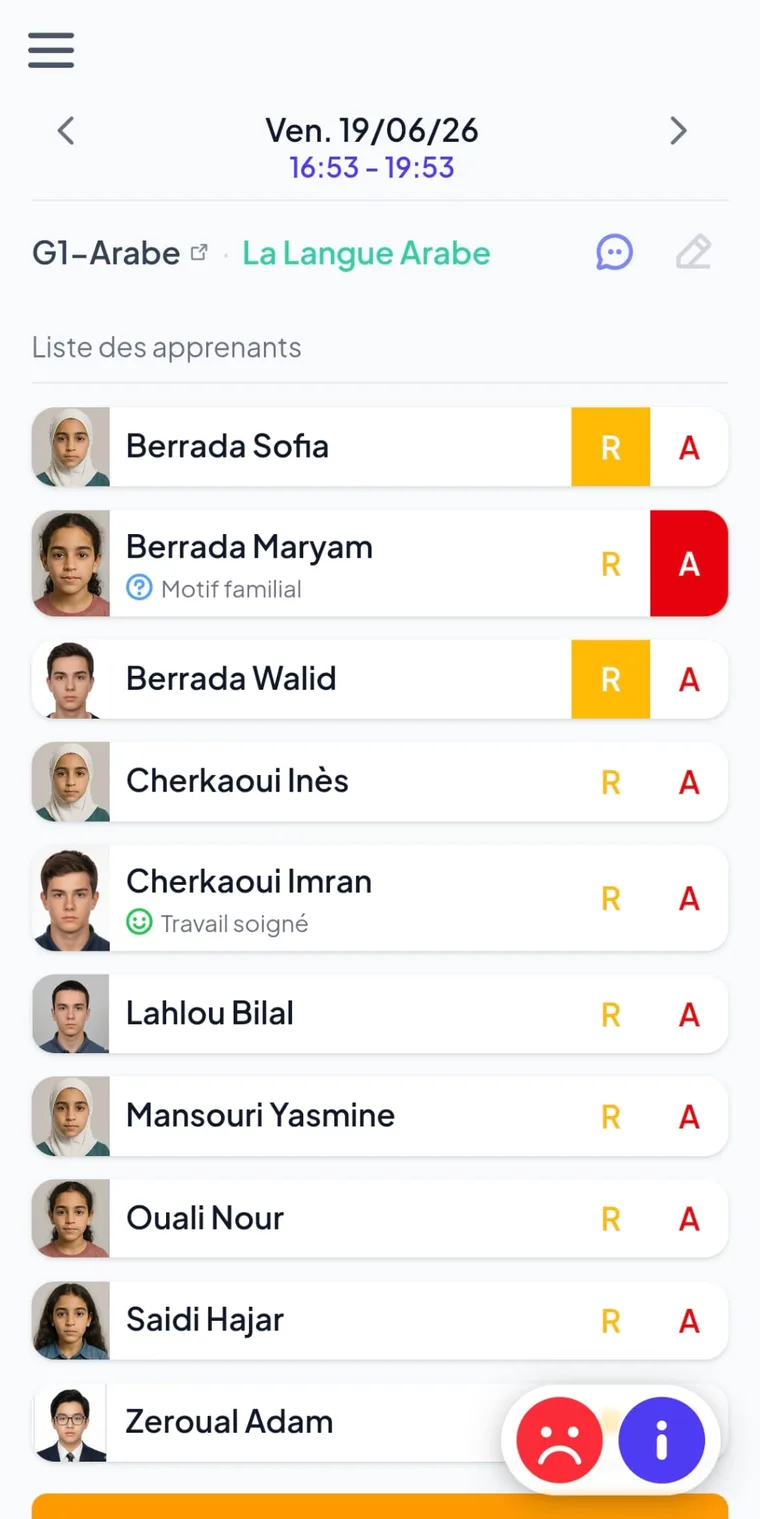
Submission locks the attendance record and triggers the notifications. As long as a session isn’t submitted, it stays flagged — impossible to forget.
Who it’s for
Roll call is taken from mobile, in seconds per learner, with no paperwork to copy out afterwards.
Unsubmitted roll calls and sessions with no homework surface on the dashboard — no session is overlooked.
A notification from the very first minute of absence, plus the history of attendance, lateness and behaviour in the bilingual EN/AR app.
Roll call feeds grades, homework and the parent app. Explore the features that chain together with it.
Frequently asked questions
Nezam’s attendance tracking software lets the instructor take roll for a session in a few taps from their phone: Present, Absent or Late, with a reason and a positive or negative behaviour. Once the roll call is submitted, the record is locked and families are notified automatically.
Yes. From the very first minute of an absence or lateness flagged during roll call, the legal guardian receives a push notification on the parent app. It’s automatic: the teaching team has no follow-up to do to inform the family.
Submitting the roll call locks the attendance record and triggers the notifications to families. As long as a session isn’t submitted, it appears in the dashboard’s list of unsubmitted roll calls, which prevents forgotten sessions and guarantees reliable tracking.
Yes. Each absence or lateness can carry a reason, and each learner can receive a positive or negative behaviour for the session. This information flows back to families via the parent app, whereas a paper roll-call book is limited to a column of ticks.
No. Roll call is designed mobile-first: the instructor does it from their phone, including over 4G networks. The data is synced in real time with the team’s web workspace and the families’ app.
Yes. Each submitted roll call feeds the learner’s history: their absences, lateness, reasons and behaviours can be viewed on their profile by the team, and followed by the family in the parent app.
Book a 30-minute demo and see roll call — and family notifications — in real conditions.