Structured groups, not lists
Build your groups as mixed, girls or boys, set a maximum capacity and let the waiting list handle full groups. You know at a glance where seats are still open.

Nezam’s group and session management brings together, on a single screen, the composition of your groups (mixed, girls or boys, with capacity), a drag-and-drop calendar view for your sessions, bulk editing and the handling of holidays and public holidays.
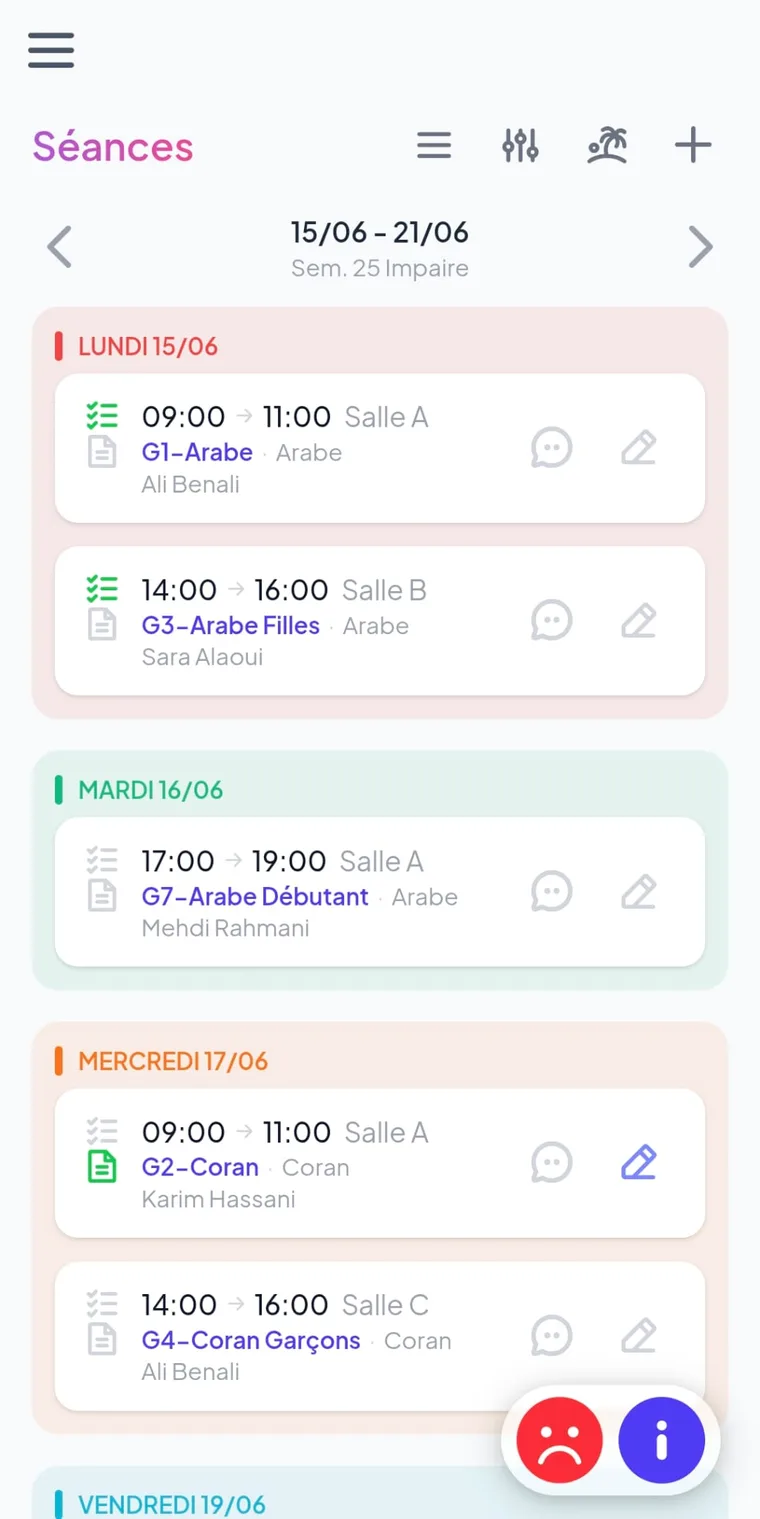
Your whole schedule, on a single screen
Why it’s better
Three concrete gains for teachers and management, from the very first term.
Build your groups as mixed, girls or boys, set a maximum capacity and let the waiting list handle full groups. You know at a glance where seats are still open.
See all your sessions by week or as a list, in a drag-and-drop calendar view. Each slot shows its group, its room and its teacher, and the wall planner becomes unnecessary.
Edit a series of sessions in a single action, set your holidays and public holidays across the whole schedule, or message a whole group. What used to take a morning takes a few clicks.
See your sessions by week or as a list. Move a slot with a simple drag, spot room conflicts and identify full groups at a glance. Each session opens straight onto the roll call.
What you manage
A focused scope: compose, plan, adjust, control — without useless modules.
Mixed, girls or boys, level, subject, room and capacity: every group is framed. Bulk actions — message, clear, delete — to manage the new term with ease.
Plan and move your sessions with drag-and-drop, by week or as a list. Each session carries its group, its time slot, its room and its teacher.
Add school breaks, holidays and public holidays to the schedule: the sessions concerned are removed from the hours count, with no manual deletion slot by slot.
Each session opens straight onto the roll call: present, absent, late, reason and behaviour. The homework for the next session is entered in the same place.
One capacity per group, a smart waiting list: a student on the waiting list is not billed until a seat opens up.
The dashboard surfaces the hours delivered and planned, the unsubmitted roll calls and the sessions without homework. Nothing slips through the cracks.
Group settings
Six settings are enough to turn a list of students into a group ready to receive sessions.
| Group setting | What it’s for |
|---|---|
| Composition | Mixed, girls or boys group, according to the organisation’s setup. |
| Level & subject | Link each group to its level and subject for consistent sessions and grades. |
| Room & teacher | Assign the room and the teacher; they appear on every session of the schedule. |
| Maximum capacity | Set the number of seats; beyond it, students move to the waiting list. |
| Waiting list | A student on the waiting list is not billed until a seat opens up. |
| Bulk actions | Message the whole group, clear or delete it in a single action. |
Block school breaks, holidays and public holidays directly on the schedule. The sessions concerned leave the count of hours delivered and planned — without deleting them one by one, and without distorting the tracking of your teachers' hours.
In practice
A term prepared once, adjusted in a few clicks all year long.
Mixed, girls or boys, with level, subject, room and maximum capacity.
Place your slots by week with drag-and-drop; each session inherits its group and its room.
Block breaks and public holidays on the schedule; the sessions concerned leave the count.
Edit a series of sessions, move or clear a group, write to all its students in a single action.
To go further
Once your groups are set, each session feeds the roll call, the grades and the communication to families.
Each session opens onto the roll call: present, absent, late, reason and behaviour, then a notification to families.
Learn moreGrade by sub-skill within each group, calculate the averages and generate the PDF report cards.
Learn moreA group’s capacity feeds the waiting list and the automatic rate of the enrolment journey.
Learn moreFamilies find their child’s session schedule in a bilingual EN/AR app, in real time.
Learn moreHours delivered and planned, unsubmitted roll calls, sessions without homework: complete oversight.
Learn moreTransparent pricing, per student per year, training and support included — with no per-module billing.
Learn moreFrequently asked questions
The Nezam calendar view shows your sessions by week or as a list, with drag-and-drop to move a slot. Each session carries its group, its time slot, its room and its teacher, and opens straight onto the roll call. You manage the whole schedule from a single screen, with no wall planner or spreadsheet.
Yes. Bulk editing lets you act on a series of sessions or on an entire group in one action: move slots, clear or delete a group, or send a message to all its students. You avoid repeating the same change session by session.
You add school breaks, holidays and public holidays directly to the schedule. The sessions concerned are removed from the count of hours delivered and planned, without having to delete them one by one. The dashboard then reflects the hours actually delivered.
Each group is configured as mixed, girls or boys depending on your organisation’s setup. You also set a maximum capacity per group. When a group is full, new students move to the waiting list and are only taken into account once a seat opens up.
The group shows its maximum capacity and switches to a waiting list once full. A student on the waiting list is not billed as long as no seat opens up; as soon as a seat becomes available, they join the group at their actual rate and are billed accordingly.
Yes. Each session opens onto the roll call: you mark present, absent or late with a reason and behaviour, then submit the roll call. The homework for the next session is entered in the same place and is automatically pushed to families.
Book a 30-minute demo and watch your schedule come to life. No card, no commitment.