Progress tracking over time
Beyond a one-off grade, follow each student's evolution term after term: progress by sub-skill and the trend of their averages, visible to the team and families alike.

Nezam's digital gradebook records assessments by sub-skill, applies your coefficients, calculates averages and ratings per term, then generates a PDF report card shared with families.
From gradebook to report card, one automated chain
What you gain
A gradebook built for the field: you grade the skill, you weight it, and the report card builds itself.
Beyond a one-off grade, follow each student's evolution term after term: progress by sub-skill and the trend of their averages, visible to the team and families alike.
Every assessment breaks down by sub-skill. You see where a student is making progress and where they are falling behind, instead of a single overall grade that hides everything.
Weight each sub-skill and each subject with a coefficient. The term average is calculated on its own — no spreadsheet, no formulas to maintain.
From “Excellent” to “Very weak”, every level speaks to families. No more explaining what a 13.5 out of 20 is really worth.
The report card is produced as a PDF and attached to the student. Families find it in the mobile app, with no emails to send one by one.
A subject breaks down into skills, then into sub-skills. Every assessment is entered at this level of detail — out of 10, out of 20, on a letter scale or as a rating. You see exactly where the student is making progress, and the weighted average per term is calculated without a single formula to maintain.
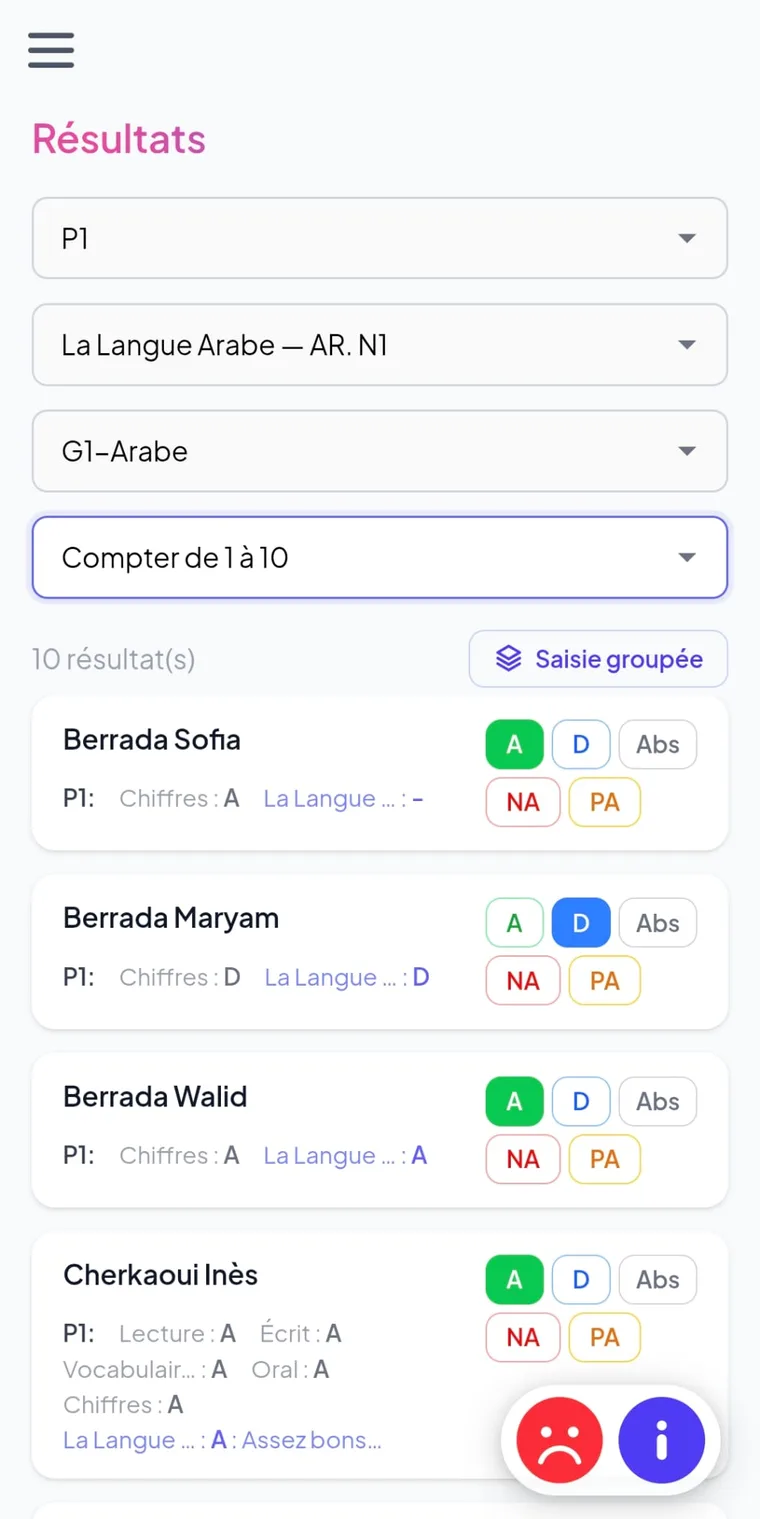
From grade to report card
The PDF report card isn't an end-of-term chore: it's the automatic outcome of your assessments.
In the settings, break each subject down into skills and sub-skills, each with its own coefficient.
Grade by sub-skill — out of 10, out of 20, on a letter scale or as a rating — directly from the group.
Weighted averages and ratings are calculated automatically per term, with no re-entry.
The PDF report card is produced and attached to the student; families read it in the mobile app.
At the end of each term, Nezam assembles a complete report card: grades grouped by skill, weighted averages, ratings and a header with your identity. The document is generated as a PDF, attached to the student and viewable by families in the bilingual EN/AR mobile app.
Who it's for
Grade without recounting
Consistent tracking
Clear results
Spreadsheet or digital gradebook
| Task | Grade spreadsheet | Nezam |
|---|---|---|
| Grades by sub-skill | Built column by column | Native, with coefficients |
| Weighted average calculation | Formulas to maintain and check | Automatic per term |
| Readable rating | Entered manually | “Excellent → Very weak” scale |
| Report card shared with families | PDF export + sent one by one | PDF generated, visible in the mobile app |
| Several scales (out of 10, out of 20, A–E) | Columns and rules to recreate | Built in, mixable per subject |
| Risk of entry error | High (copy-paste, formulas) | Reduced, calculations centralised |
The rest of the platform
The gradebook connects with Nezam's other modules — the same data, everywhere.
Take attendance in a few taps, with reasons and behaviours, and alert families from the very first absence.
Learn moreGrades, averages, PDF report cards and homework in a bilingual EN/AR app, multi-child, in real time.
Learn moreGrade straight from the group: schedule, holidays and public holidays, bulk actions on sessions.
Learn moreFrequently asked questions
Nezam's digital gradebook is a module that records assessments by sub-skill, applies coefficients, calculates averages and ratings per term, then generates a PDF report card shared with families. It replaces the grade spreadsheet and the report card filled in by hand.
Yes. Each subject breaks down into skills and sub-skills, and the grade is entered at sub-skill level. This gives you precise tracking of what has been learned, whereas a simple subject grade hides a student’s strengths and weaknesses.
Averages are weighted: each sub-skill and each subject carries a coefficient, and Nezam automatically calculates the average per term. You have no formula to maintain and none of the entry errors of a spreadsheet.
Nezam offers an eight-level rating scale, from “Excellent” to “Very weak” (Excellent, Very good, Good, Fairly good, Satisfactory, Average, Weak, Very weak). You can also grade out of 10, out of 20 or on a letter scale.
No. The report card is a generated PDF document that brings together grades by skill, weighted averages and ratings, not a simple arithmetic mean. It is attached to the student and viewable by families from the mobile app.
Yes. Parents and students view grades, averages and PDF report cards in real time from the bilingual English/Arabic mobile app. Sharing results no longer means sending emails one by one.
Book a 30-minute demo and see the gradebook applied to your own subjects.