
Online enrolment that bills itself
Nezam's school enrolment and payment software guides families through a public 4-step journey, calculates the price automatically (subject packs, member discount, fees, tax, instalments), handles the waiting list and lets you collect the deposit online.
From request to payment, one chain with no re-entry.
In video
Online enrolment, in real conditions.
Watch a family enrol from start to finish: subject selection, time slots, file and payment — paperless.
Public journey
From request to payment, in 4 steps.
An online enrolment page, connected to your application: families fill in the form themselves and the application lands straight in Nezam — nothing to build or host on your side.
- 1
Students & subjects
The family picks the students to (re-)enrol and selects their subjects — with subject packs and member discount applied automatically.
- 2
Choosing time slots
They book the available slots. When a group is full, the student moves to the waiting list without blocking the rest of the application.
- 3
Legal guardian
Legal guardian details and data-protection consents: the file is tied to the right family, ready to be tracked.
- 4
Summary & payment
The price is calculated automatically, you collect the deposit online and the enrolment is recorded. Zero re-entry on the team side.
A full group never blocks an enrolment.
When a group is full — or a placement test or a meeting is required — the student concerned moves to the waiting list. They show at $0 and do not enter billing, while the rest of the family's application proceeds normally.
- Waitlisted student shown at $0, out of billing
- The rest of the application (other students, other subjects) stays payable
- Place freed up: the session is recalculated and the student added at their real price
Online payment
Enrolment, 100% online.
Thanks to payment-provider integrations (Stripe and others), families enrol and pay online, and payment tracking updates automatically.
Secure online payment
Collect card payments right inside the enrolment flow, through integrations with providers such as Stripe and others.
100% online enrolment
From picking subjects to paying, families do everything online — no paper, no re-entry for your team.
Automated payment tracking
Online payments reconcile themselves: paid / partial / pending status updated automatically, reminders made easy.
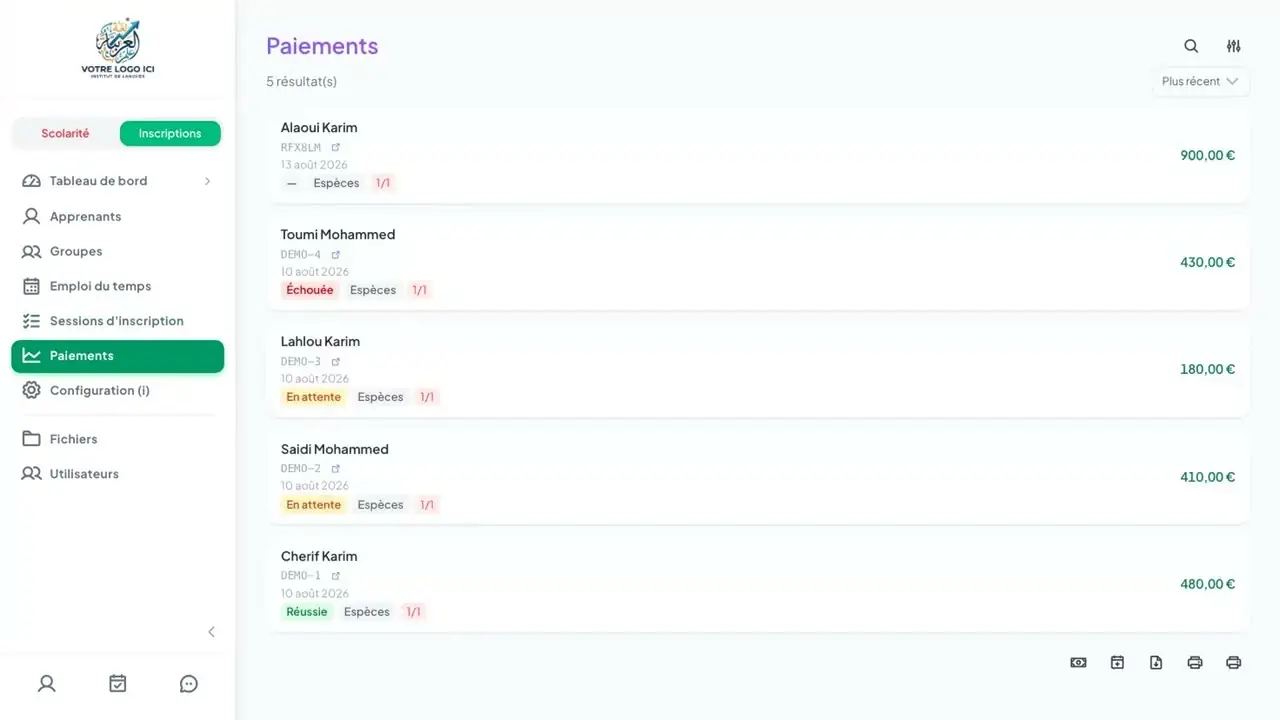
Payment tracking
Every dollar collected, in its place.
Online payment or manual entry: every transaction is centralised, with its payment method and its status.
| Payment method | Online (deposit) | Manual entry | How it's tracked |
|---|---|---|---|
| Cash | — | ✓ Yes | Payment recorded manually by management. |
| Cheque | — | ✓ Yes | Entered manually, with status paid / partial / pending. |
| Bank transfer | — | ✓ Yes | Reconciled and recorded on receipt against the file. |
| Card | ✓ Yes | ✓ Yes | Deposit collected online during public enrolment. |
The status of each transaction
The amount due has been collected in full.
A deposit or an instalment is collected, a balance remains due.
No payment recorded so far.
The transaction did not go through or was cancelled.
Management can collect online or record a manual payment. The amount due recalculates automatically and the dashboard aggregates the collected, refunded and outstanding amounts per month and per year.
Going further
Enrolment is only the start of the journey.
Once the file is created, the same data feeds the groups, attendance, grades and the parent app.
Nezam pricing
Two plans, per student per year: from $2.40 with Complete and from $4.05 with Tailored, from 300 students. Training and support included.
Learn moreParent app
Once enrolled, families track attendance, grades and report cards in a bilingual EN/AR app.
Learn moreGroups & sessions
The slots booked at enrolment feed directly into your groups and your session schedule.
Learn moreAttendance & roll call
From day one, roll call and absence notifications build on the enrolled students.
Learn moreFrequently asked questions
Everything about enrolment and payment.
How does online enrolment work with Nezam?
Online enrolment runs through a public 4-step journey: choosing students and subjects, choosing time slots, legal guardian details, then summary and payment. The price is calculated automatically (packs, member discount, fees, tax, instalments), you collect the deposit online and the application reaches your team directly, with no re-entry.
Is the price really calculated automatically?
Yes. From your reference data (subjects × levels, subject packs, discounts, enrolment fees, tax), Nezam calculates the amount due for each student at the moment of enrolment. The family sees a clear summary before paying; you have no manual calculation to redo.
What is the smart waiting list?
When a group is full — or a placement test or a meeting is required — the student concerned moves to the waiting list: they show at $0 and do not enter billing. As soon as a place opens up, the session is recalculated and the student is added at their real price, automatically.
Which payment methods are supported?
Transactions can be recorded as cash, cheque, bank transfer or card. You collect the deposit online at enrolment, and management can also enter a payment manually. Each transaction has a status: paid, partial, pending, cancelled or failed.
Can management create an enrolment manually?
Yes. From the web workspace, management can create an enrolment session for a legal guardian, select subjects per student and collect a manual payment. These are the same calculation and waiting-list rules as in the public journey.
How do you track payments day to day?
The Payments page brings together all transactions with their payment method and status (paid, partial, pending, failed). The dashboard aggregates the collected, refunded and outstanding amounts per month and per year, to steer your organisation’s cash flow.
Open your enrolments without a spreadsheet.
Book a 30-minute demo: we'll show you the public journey, automatic pricing and payment tracking in real conditions.
- No commitment
- One-month trial
- GDPR-compliant
- Hosted in your country